
Hanh Hoang
Jan 27 2026 •13 minutes
Amazon A+ Content has become one of the most powerful tools for boosting product conversions, enhancing customer experience, and building brand credibility on the world’s largest marketplace. In 2026, Amazon continues to prioritize visual storytelling, trusted product information, and optimized detail pages-and A+ Content sits at the heart of this strategy.
This guide covers everything you need to know about A+ Content, including what it is, why it matters, how to create it, and best practices to outperform competitors.
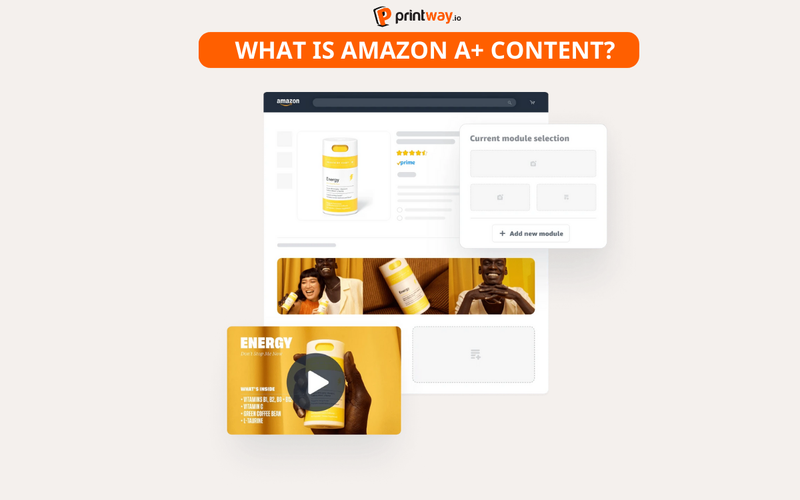
Amazon A+ Content is an enhanced product description feature allowing brand-registered sellers to upgrade standard product pages with rich visuals such as:
A+ Content helps communicate product value clearly and professionally, reducing customer confusion and increasing buying confidence. This feature is available to Brand Registered Amazon sellers and is now considered essential for premium brand presence.
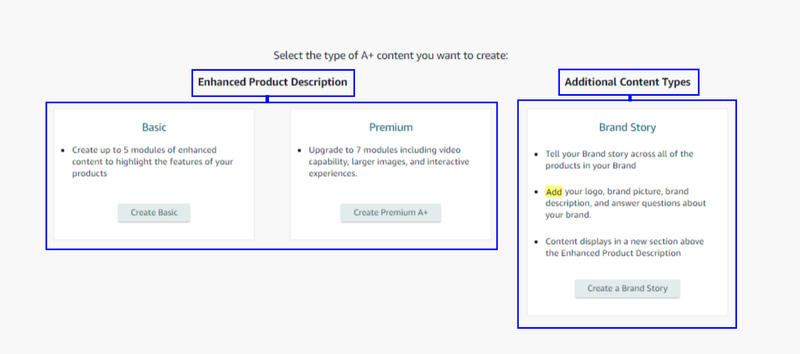
There are two tiers:
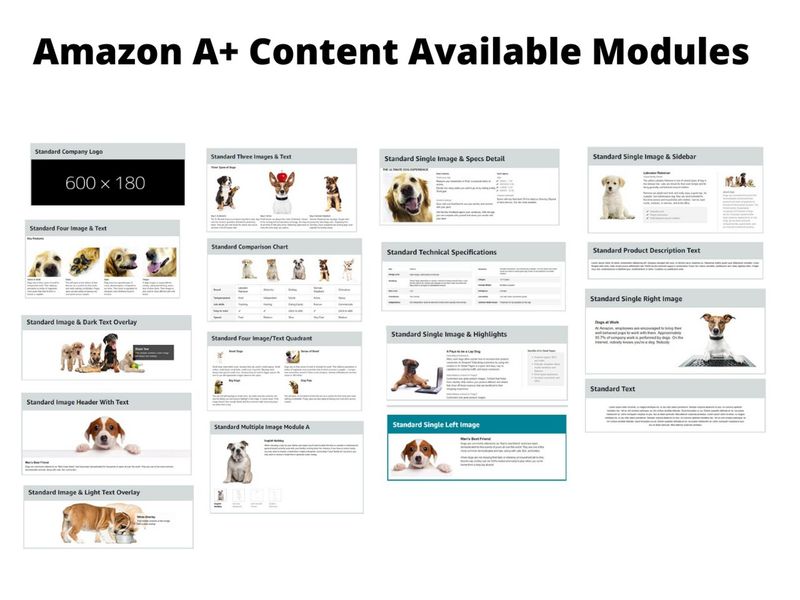
A+ Content is built block by block using content modules - pre-designed layout templates you stack together to create a complete enhanced listing. Each module serves a distinct purpose, and knowing which ones to use (and when) is the difference between a listing that converts and one that gets scrolled past.
Here are the most important modules every Amazon seller should know:
Standard Modules (Basic A+):
| Module Name | Best Used For |
| Standard Company Logo | Brand identity reinforcement at the top of the listing |
| Standard Image Header with Text | Hero banner - your product's main visual statement |
| Standard Image with Dark/Light Text Overlay | Short compelling headline layered over a lifestyle image |
| Standard 3 Images & Text | Showcasing product angles, use cases, or color variants |
| Standard Four Image/Text Quadrant | Highlighting 4 key product features in a grid format |
| Standard Single Left/Right Image | Side-by-side image and benefit-focused text |
| Standard Comparison Chart | Cross-selling or upselling your own product variants |
| Standard Technical Specifications | Listing dimensions, materials, compatibility data |
| Standard Product Description Text | Text-only block for detailed product storytelling |
The comparison chart module is a powerful opportunity to display product information such as model type, dimensions, and other features - and it lets you highlight other products you sell, making it ideal for cross-selling or upselling to customers who land on your listing.
Premium A+ Modules (Unlocked after Brand Registry + 5 approved A+ updates):
At Printway, sellers fulfilling personalized products on Amazon can leverage this module strategy effectively. With 800+ product options across Home Decor, Apparel, and Accessories, there's plenty of visual material to build a compelling A+ Content layout that converts.
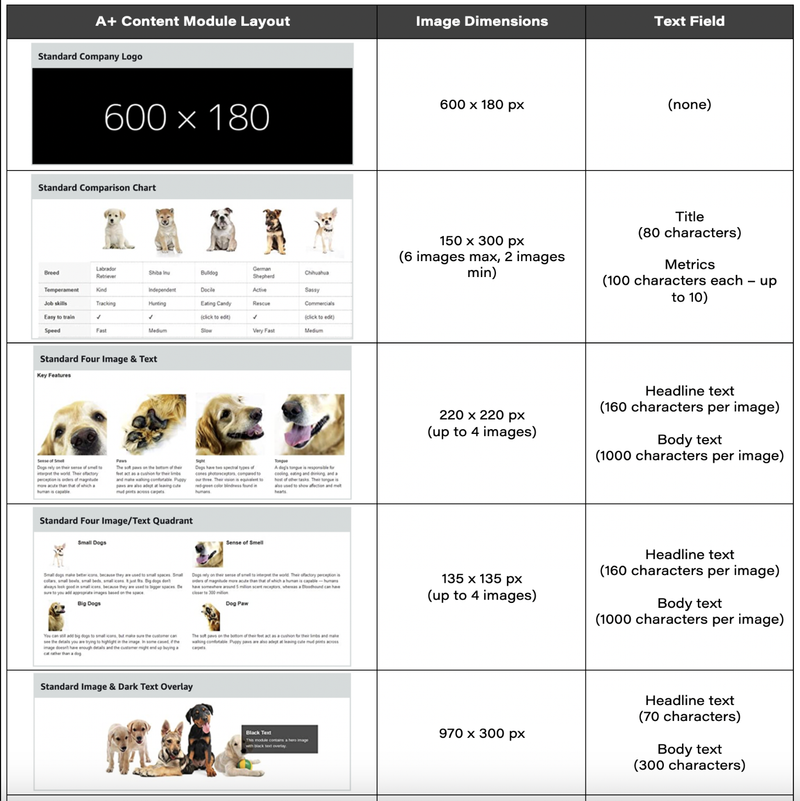
Getting your image dimensions right isn't optional - it's essential. Incorrect sizes can lead to stretched images, truncated text, or frustrating user experiences that deter potential buyers. Amazon enforces strict specifications for every module, and submissions that don't meet the requirements will be rejected or render poorly on mobile.
Here is the complete image size reference for Standard A+ Content:
| Module | Image Dimensions | Notes |
| Company Logo | 600 × 180 px | Centered; keep it clean and readable on mobile |
| Image Header with Text | 970 × 600 px | Most powerful module; use for hero banner |
| Image with Text Overlay | 970 × 300 px | Dark or light overlay variant available |
| Three Images & Text | 300 × 300 px each | Show product angles or use cases |
| Four Image/Text Quadrant | 135 × 135 px each | Compact grid; highlight 4 features |
| Single Left/Right Image | 300 × 300 px | Side-by-side image + text layout |
| Single Image & Sidebar | 300 × 400 px (main) / 350 × 175 px (sidebar) | Great for info-dense sections |
| Comparison Chart | 150 × 300 px per product | Supports 2–6 products |
For Premium A+ Content, dimensions expand significantly:
| Premium Module | Image Dimensions |
| Premium Full Image Module | 1464 × 600 px (desktop) / 600 × 450 px (mobile) |
| Premium Dual Images with Text | 650 × 350 px per image |
| Premium Four Images with Text | 300 × 225 px per image |
| Premium Comparison Table | 200 × 225 px per product image |
| Premium Full Video | 1920 × 1080 px (MP4 format) |
Universal technical requirements across all modules:
For mobile optimization, ensure text overlays are readable with a minimum font size of 24px, and maintain consistent lighting, backgrounds, and styling across all images.
One rule that catches most sellers off guard: If you embed text into your images, use a font size of at least 30pt relative to the image dimensions - on mobile, a 970px-wide banner shrinks to the size of a postage stamp, making small text completely unreadable.
Understanding the theory is one thing - seeing how real, high-converting A+ Content is structured helps you build your own with confidence. Here are three practical examples covering different product categories and seller goals:
This is the sweet spot for POD sellers, and it's where Printway's fulfillment expertise shines. A seller offering custom name ornaments might structure their A+ Content like this:
This layout answers the buyer's three core questions: What does it look like? How is it made? Which version should I order?
For apparel sellers using a POD fulfillment partner like Printway, A+ Content can eliminate the sizing uncertainty that leads to returns:
The technical specifications module is especially useful for sharing granular product details - think about the product from the customer's perspective and ask what qualities might matter as they weigh a purchase.
What makes all three examples work?
They follow the 70/30 rule: A+ Content should be roughly 70% visual and 30% text - paragraphs should never exceed 3–4 lines, and if a feature needs more explanation, break it into bullet points. They also answer the unspoken question every Amazon shopper has: "Can I trust this seller and this product?"
For POD sellers working with a fulfillment partner like Printway - which handles production across facilities in the US and Vietnam with a capacity of 120,000 orders/day - having A+ Content that confidently showcases product quality isn't just nice to have. It's what separates the brands that scale from the listings that stagnate.
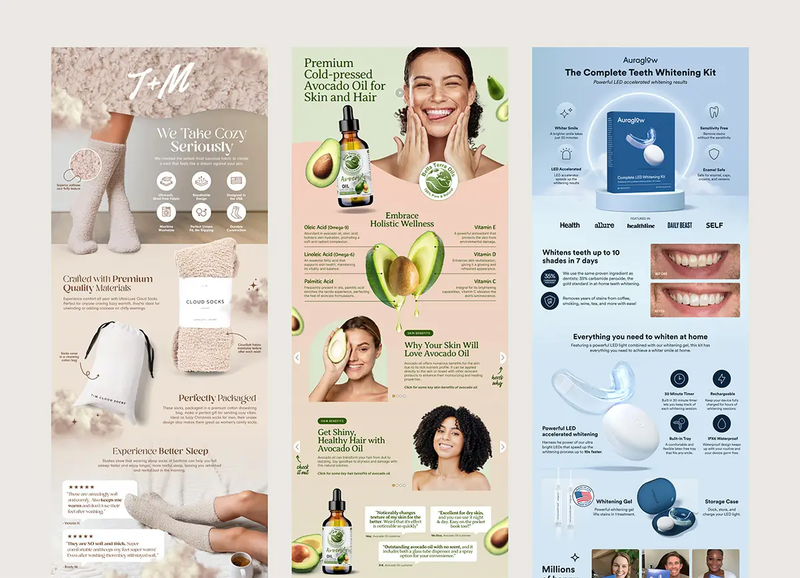
A+ Content is one of the most measurable levers for increasing Amazon conversion rates. Amazon’s internal data (Vendor Central & Brand Registry reports) consistently shows that adding A+ can lift conversions by 3%–10%, and in some competitive categories (beauty, supplements, home decor), the uplift can reach 15%+ when combined with strong product images.
Key reasons this happens:
In 2026, Amazon increasingly favors brand-driven content, rewarding sellers who communicate clearly and authentically. Premium A+ (formerly A++ for Vendors) gives brands the ability to showcase:
This is particularly powerful because:
In marketplaces full of generic competitors, storytelling is now a must-have advantage.
Customers today expect transparency. A+ Content provides:
When buyers fully understand what they’re purchasing, it naturally leads to:
You’re essentially answering questions before the customer asks them.
One of the most financially valuable modules inside A+ is the comparison table, because it helps:
Examples of smart cross-selling via comparison charts:
This is a subtle but powerful revenue booster.
Although A+ Content does not directly index for SEO keywords, it improves your listing relevance indirectly by boosting:
These behavioral signals help Amazon rank your listing higher in search results-especially under the 2025–2026 “content quality & engagement” algorithm update.
Better A+ → Better CVR → Better ranking → More sales.
A+ Content is not available to every seller by default. As of 2026, only two groups can access and publish A+ modules:
To qualify, sellers must:
Eligible seller types include:
Brand owners working directly with Amazon as suppliers automatically qualify for A+ and Premium A+ (A++).
Note: Resellers or arbitrage sellers who don’t own a trademark cannot create A+ Content.
Amazon has strengthened its content quality and compliance policy. A+ Content must follow strict rules to ensure accuracy, safety, and brand transparency.
Sellers must not include:
Amazon typically reviews content within 24–48 hours. Edits or resubmissions may be required if guidelines aren’t met.
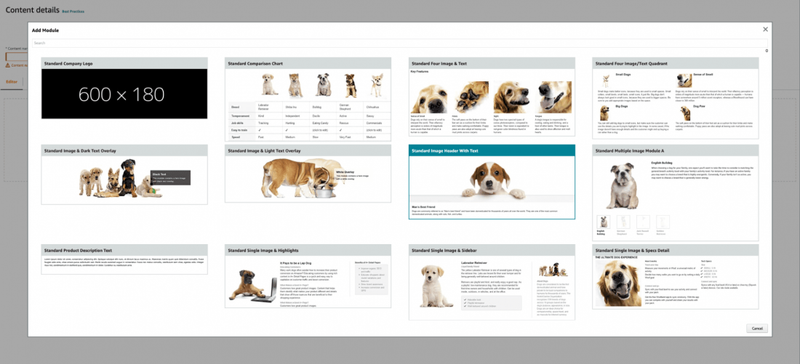
A+ Content offers various modules suitable for product storytelling. Common module types include:
4.1. Standard Image Header – Large hero image with product or lifestyle visual
A large, full-width visual used at the top of the A+ section.
Best for:
This module sets the tone for the entire page and is crucial for premium positioning.
4.2. - Standard Single Image & Text – Simple layout for highlighting features
A balanced layout featuring one image paired with a text block.
Best for:
4.3 - Standard Multiple Image Module – Ideal for showcasing benefits or features
A grid of 3–5 images, often accompanied by captions. Best for:
Ideal for products where customers need visual clarification before purchasing (home decor, tools, electronics, fashion, etc.).
4.4 - Standard Technical Specifications – Table format for product attributes
A table-style module presenting detailed product information. Best for:
Clear specs help reduce returns by ensuring customers understand the physical details before buying.
4.5 - Standard Comparison Chart – Cross-sell other products
A side-by-side table comparing the product to your other listings. Best for:
Cross-selling related products
Helping customers navigate your catalog
Encouraging upgrades to higher-value models
This module increases Average Order Value (AOV) and reduces abandoned purchases caused by confusion.
4.6 - Brand Story Module – Banner + carousel to showcase brand identity
A horizontal banner + carousel section dedicated to brand identity. Best for:
Choosing the right module mix depends on your product type, target audience, and brand style.
Creating high-performing Amazon A+ Content requires both strategic planning and attention to detail. Before diving into the step-by-step process, it’s important to understand how each stage-from research to layout selection-contributes to stronger engagement and higher conversions. The following guide breaks down every step so sellers can build A+ modules that meet Amazon’s standards and effectively influence buying decisions.
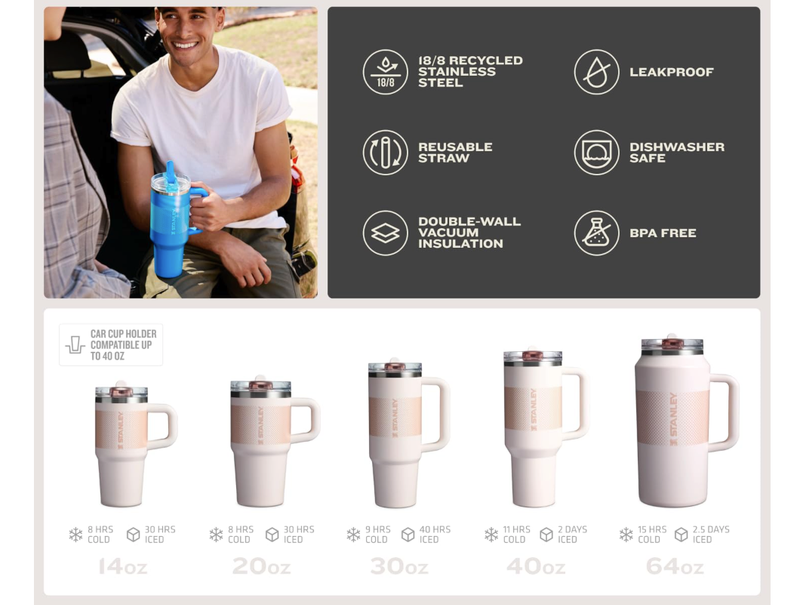
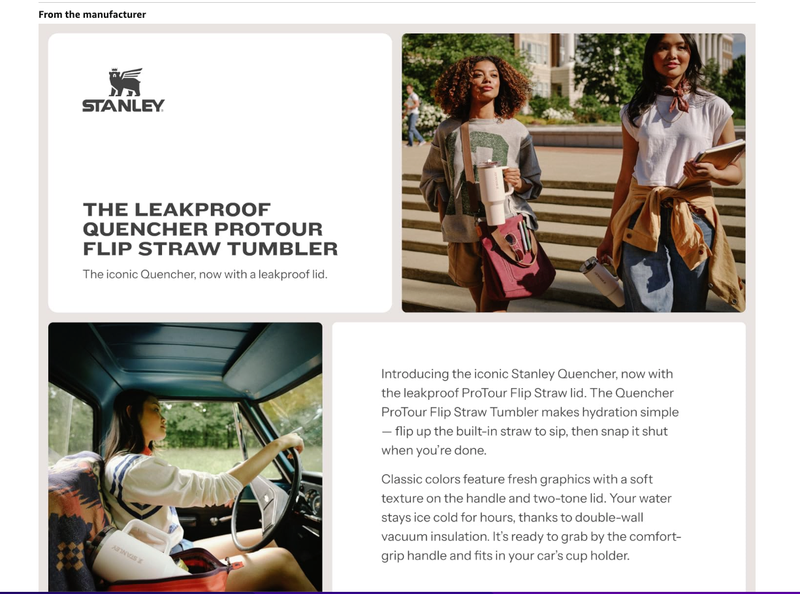
Source: Stanley
A winning A+ layout should:
Source: Stanley
Amazon recommends:
Use short sentences, bullet points, and scannable formatting.
Focus on:
Before submitting:
Below is a breakdown of the most impactful A+ Content best practices every seller should follow to maximize visibility and drive more sales.
Source: Apple Store on Amazon
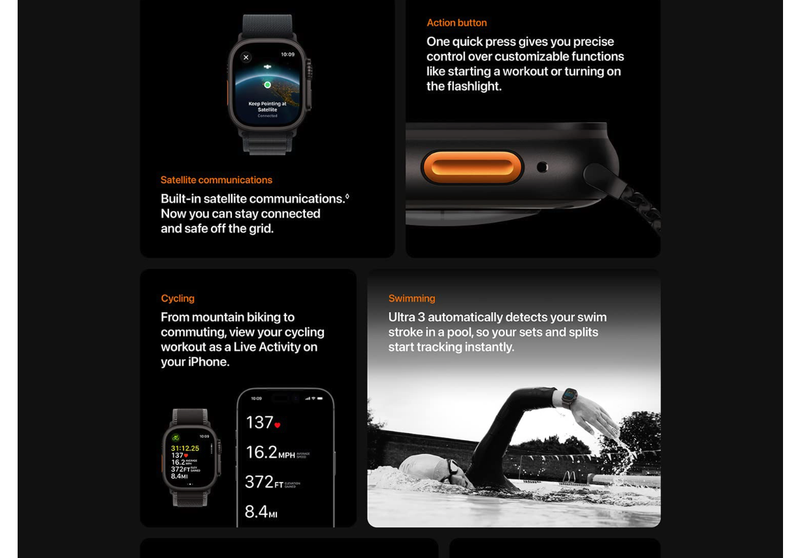
Amazon A+ Content is a visual-first format. Prioritize high-resolution product photography, lifestyle images, and clear infographics that quickly communicate value and eliminate buyer hesitation. Visuals should highlight key benefits, materials, use cases, and context size.
Modern shoppers-especially on mobile-scan rather than read. Replace long paragraphs with short, benefit-driven statements, bullets, and headers. Ensure every line answers: “What’s in it for the customer?”
A+ Content must communicate your unique selling points (USPs). Answer the critical question: “Why should a customer choose your product instead of competitors?” Use diagrams, comparison visuals, or value-focused statements to highlight superior features, better materials, or enhanced functionality.
Since the majority of Amazon traffic is mobile, ensure fonts, images, and module layouts are readable on small screens. Test legibility, spacing, and contrast across devices to prevent drop-offs in mobile conversions.
Comparison charts are one of Amazon’s strongest CRO tools. Use them to:
Highlight product variations, sizes, and upgrades
Introduce premium bundles
Showcase alternate models in the same product family This improves average order value (AOV) and keeps shoppers inside your brand ecosystem.
For maximum trust and conversion, align your A+ Content, product images, title, and bullet points. Matching messaging reduces friction and reinforces your brand’s credibility throughout the entire listing.
Regular optimization is essential for staying competitive on Amazon in 2026. Track:
Use this data to A/B test different layouts, visual styles, messaging angles, and comparison modules to unlock ongoing performance improvements.
Amazon A+ Content is a powerful tool for boosting conversions, improving customer understanding, and differentiating your brand in an increasingly competitive marketplace. By combining compelling visuals, clear product information, and SEO-aligned best practices, sellers can create product pages that not only meet Amazon’s 2026 standards but also deliver a stronger shopping experience. When executed correctly, A+ Content becomes a long-term asset that elevates brand presence and maximizes profitability across Amazon’s ecosystem.
Amazon A+ Content is an enhanced product description feature that allows brand-registered sellers to add visual modules, comparison charts, and structured information to improve product storytelling and increase conversion rates.
Only sellers enrolled in Amazon Brand Registry and vendors using Vendor Central can create and publish A+ Content. This includes private-label brands, manufacturers, and authorized brand agents.
For Brand Registered sellers on Seller Central, A+ Content is free. Vendors may incur additional fees depending on their Vendor Central agreements, especially for Premium A+ Content.
Premium A+ Content (A++ Content) offers more advanced layouts, interactive modules, enhanced visuals, and video support. It improves engagement and can significantly increase conversion but is usually available to brands with strong performance metrics.
Go to Seller Central → A+ Content Manager → Create A+ Content, choose your modules, upload images and text, and submit for approval. Amazon reviews the submission within 24–48 hours.
Common high-performing modules include image headers, single-image + text blocks, multiple image modules, technical specification tables, comparison charts, and brand story modules.
Yes. While A+ Content does not directly affect keyword ranking, it improves conversion rate, session time, and customer engagement, all of which positively influence organic ranking in Amazon’s A9/A10 algorithm.