Recently, we've witnessed the rapid development of AI tools, which help merchants run e-commerce businesses effectively. Especially, in case you run print-on-demand stores, using AI tools can help you save a lot of time and money when creating new designs and marketing campaigns for various platforms such as websites, email marketing, and social media.
If you want to update more print-on-demand AI tools to optimize your POD stores, this article today is tailored for you. The following are 6 useful AI tools that are helpful for e-commerce businesses and especially suitable for print-on-demand businesses.
I- Print-on-demand AI Tools' Functions
When launching a print-on-demand business, sellers must control multiple tasks, from designing and marketing to customer service. Fortunately, thanks to the development of many AI tools, e-commerce sellers, specifically POD ones, can save more money and time when doing these tasks.
For instance, one of the most challenging tasks with a POD store is creating new designs. Nowadays, thanks to text-to-image generating tools, you can inspire and assist designers to make new designs quickly and efficiently.
Additionally, creating marketing content for various platforms can be time-consuming. By utilizing some AI tools, marketing members can reduce time for writing content for social media, blogs, or email marketing.
That's why we researched and collected a list of the most valuable AI tools for print-on-demand businesses, helping merchants optimize their time and improve the store's quality.
II- Best Print-on-demand AI Tools
1- Midjourney
Overview:
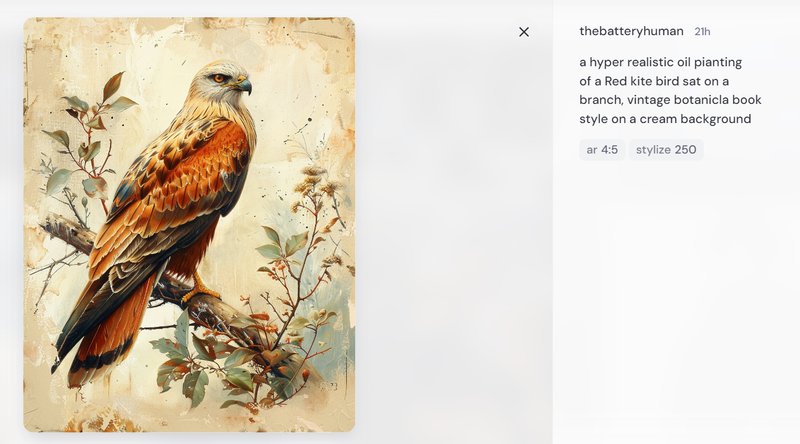
Midjourney Bot stands out as one of the leading text-to-image generation tools available today. This innovative tool allows users to create stunning visuals by interacting with the bot on Discord.
Users can use a short text description (known as a prompt) to request this tool create an image. The beginning of each command is /imagine.
Users should use concise prompts to ensure the best image output. For example, you can use the prompt "Bright orange California poppies drawn with colored pencils" instead of "Show me a picture of lots of blooming California poppies, make them bright, vibrant orange, and draw them in an illustrated style with colored pencils".
To learn more about how to craft effective prompts and get the most out of Midjourney Bot, visit any #General or #Newbie channel on Discord, or follow this Midjourney link for detailed guidance.
Pros and Highlighted features:
This app is appreciated to be user-friendly because users can access Midjourney via Discord browser, mobile app, or desktop app.
The result provided by Midjourney is also appreciated to be accurate as expected.
In addition to creating images from text descriptions, Midjourney offers a variety of stylistic effects to enhance your output.
Cons:
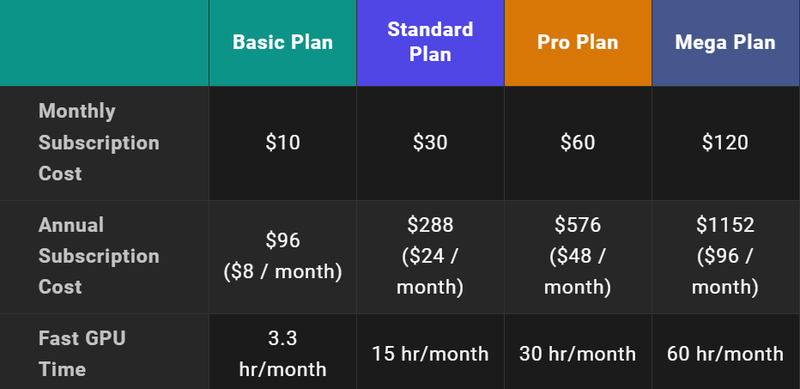
There's no free trial for this AI tool. You need to pay at least $10 for the basic plan to get started and experience its features.
As mentioned above, you can access Midjourney via the Discord-based interface. However, this is also the only way for users to access Midjourney.
One important consideration is that all generated images are public, which means other users can view and utilize them.
Many users complain about poor customer service and inconsistent image quality.
Pricing:
Midjourney offers 4 types of plans to be suitable for different demands of users, including basic, standard, pro, and mega plans. The higher the plan you subscribe to, the more GPU time you and your team can use. Follow the subscription plan link to explore more details of these plans.
2- DALL-E
Overview
DALL-E is well-known as a top-notch image AI creation invented by OpenAI. Only by some simple text can users use this tool to create wonderful images with intricate details.
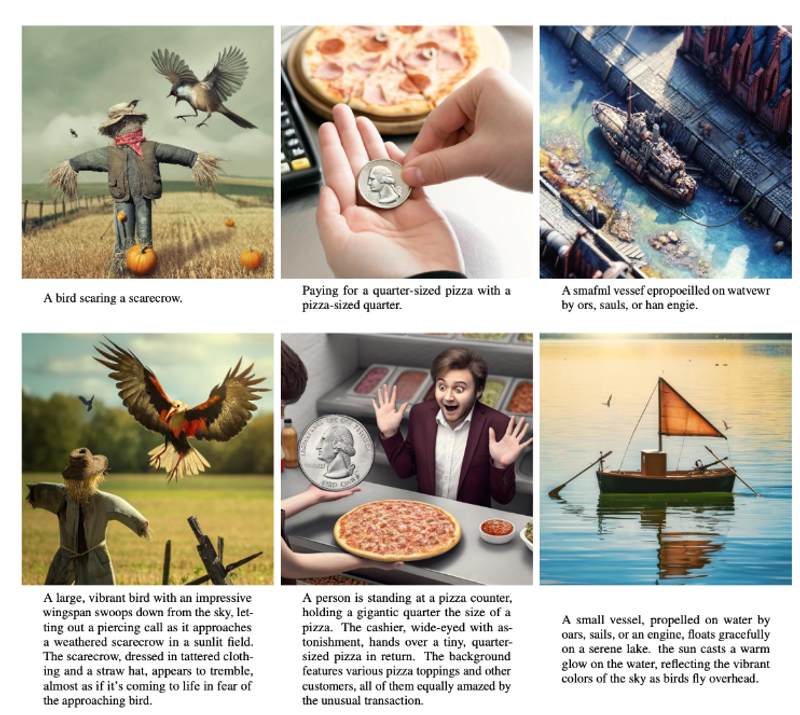
With the OpenAI foundation, this tool can understand more deeply the textual description than many AI tools. To have the best output, users should create detailed prompts.
Pros and highlighted features:
DALL-E allows users to edit generated images using 2 techniques including inpainting and outpainting. By combining these methods, you can finely adjust your images to perfection.
Moreover, this is also appreciated as an ideal tool for generating digital artwork without any licensing restrictions, making it suitable for commercial use.
Users can upload images and transform them into various artistic styles, such as oil paintings or watercolors.
Cons
Because of using credits for generating images, DALL-E's pricing is higher than other AI tools.
Preferred for surreal artworks but not ideal for certain types of images and other detailed artworks such as decent portraits of a person or natural images.
Furthermore, users shouldn't write complicated prompts. For example, if the prompt contains more than 3 objects, the output will not be as expected.
Because DALL-E uses a collection of images, generated images can sometimes appear similar. That's why sellers should consider carefully before choosing AI images for commercial purposes.
Pricing
DALL-E uses a credit-based pricing system where users use credits to generate images.
DALL-E comes with ChatGPT plus with a $20 per month subscription.
DALL-E 3 (Standard): $0.040 - $0.080 / image
DALL-E 3 (HD): $0.080 - $0.120 / image
DALL-E 2: $0.016 - $0.020 / image
3- ChatGPT
Overview:
This chatbot offers natural, engaging conversations with users, making it a valuable tool for businesses. It excels in understanding both spoken and written languages, even humor.
By providing prompts, this AI tool can perform a wide range of tasks such as answering questions, writing essays, summarizing documents, and even developing software.
So, with print-on-demand businesses, ChatGPT can easily assist marketers in writing product descriptions, creating social media posts, drafting email marketing campaigns, and even producing informative blog posts to educate their audience.
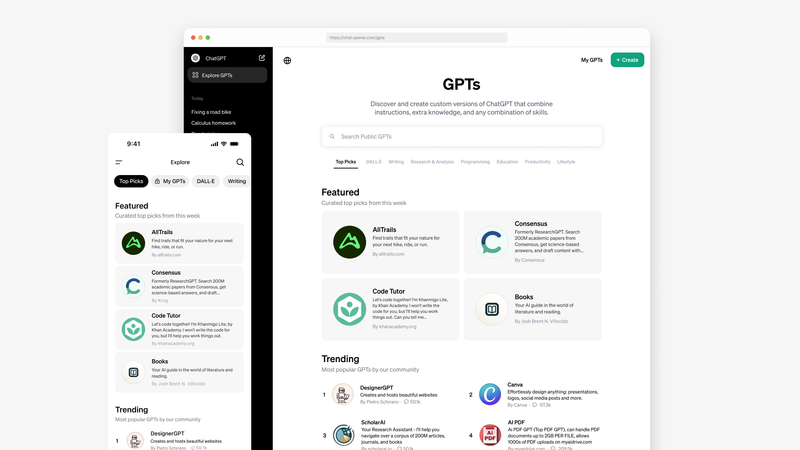
Recently, you can find many useful apps in GPT stores that are specially made for POD sellers while maintaining user-friendly interfaces. Here are the top 4 AI print-on-demand apps thatyou can find in GPT stores.
Subniche Sniper- This tool helps sellers identify sub-niches within a specific topic, making it easier to target a specialized market.
Merch on-demand Listing Creator - This ideal app assists Amazon sellers in creating and optimizing listings, including product descriptions.
Niche Connect for T-shirt Creators - This is perfect for T-shirt POD businesses because it helps find sub-niches and target specific audiences.
POD Buddy- An all-in-one app that aids in creating images, suggesting designs, and identifying relevant keywords for your products.
Pros and highlighted features
ChatGPT can be available 24/7, which suits global marketers whose customers come from various time zones.
ChatGPT can communicate in multiple languages, which is important in supporting global customers.
This intelligent tool enables sellers to create a wide range of content for various platforms, including email marketing, blog posts, and social media.
By using prompts that instruct ChatGPT to incorporate keywords, marketers can enhance SEO for blog posts and product descriptions in their print-on-demand (POD) stores.
Cons
In reality, users still need to review after using ChatGPT because the data from this tool is limited and lacks up-to-date information.
Furthermore, users need to take time to train this AI tool to ensure the output's quality, because ChatGPT can provide incorrect information in many ambiguous queries.
Despite updating constantly, many users complain that the outputs from this AI tool show a lack of emotional intelligence.
And one of the big problems of ChatGPT is privacy concerns, and handling sensitive data. E-commerce businesses should take care of customers' personal information when feeding AI because this can lead to lawsuits and a loss of customer confidence.
Pricing
Free: Access to GPT-3.5 and limited access to GPT-4o
Plus ($20/month): With this plan, users can access GPT-4 and limited access to GPT-4o. The plan is also suitable for individuals who want to boost their productivity.
Team ($25/ user/ month billed annually and $30/ user/month billed monthly): When upgrading the team plan, users will have higher message limits on GPT-4, GPT-4o, and tools like DALL·E. The choice is also suitable for teams who want to supercharge collaboration.
Enterprise (contact sales): With the enterprise plan, users can use GPT-4, GPT-4o, and tools like DALL·E, Browsing, data analysis, and more without any limit. Therefore, this suits innovative companies who are looking to scale securely.
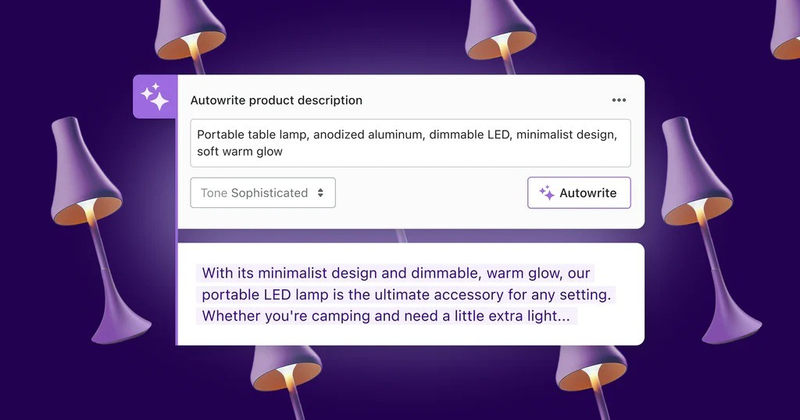
Shopify Magic is evaluated to be a big hit with E-commerce sellers who launch their business on this famous platform. By utilizing this tool on Shopify, print-on-demand sellers can transform the way businesses operate and engage with customers.
AI-powered functionalities are integrated into Shopify's products and processes to create many types of content, such as product descriptions, emails, and blog posts. By providing specific keywords, this tool can quickly generate content that meets SEO standards.
Pros and highlighted features
Shopify Magic offers a user-friendly interface, making it easy for beginners to navigate and manage their print-on-demand businesses.
With Shopify Magic, sellers can effortlessly craft SEO-friendly product descriptions in various tones, enhancing their product visibility.
For customer service, this tool enables sellers to create personalized FAQs, guiding potential buyers closer to making a purchase.
Shopify Magic also assists in writing compelling subject lines and body copy, which brings your email marketing performance to the next level.
Cons
When using the content generated by AI, users should consider Google Search's evaluation. Sellers should proofread carefully before publishing because the system of Google Search can evaluate and prevent poor-quality AI content. Follow this link to learn more about the E-E-A-T standards by Google
Pricing
Different from other AI tools, one of the biggest advantages of Shopify Magic is its pricing. This is free for all Shopify merchants regardless of their plan.
5- Jasper and Jasper Art
Overview
For a long time, Jasper has been well-known for AI content creation. This tool is highly praised for its effectiveness in generating and proofreading high-quality content across various platforms including blog posts, emails, social media, and advertisements.
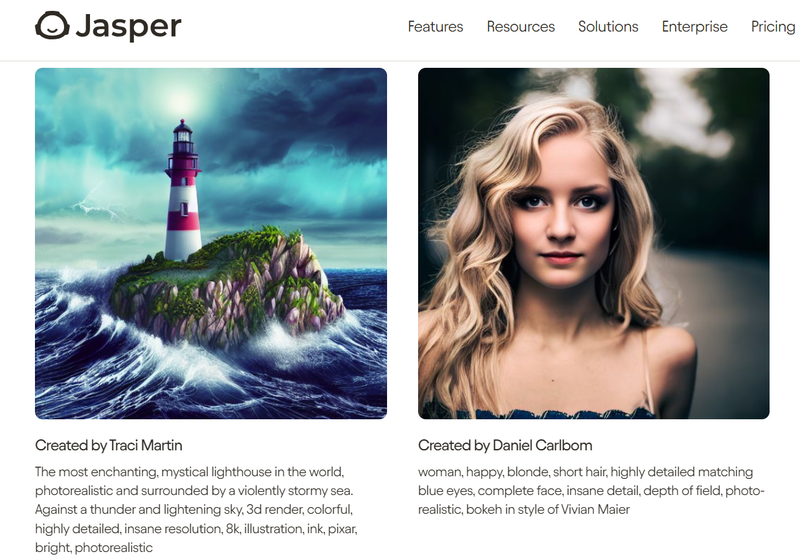
Recently, Jasper Art is also appreciated as one of the effective print-on-demand AI tools thanks to its functions as a text-to-image generator, available as an add-on for Jasper users. Users can make creative images by using prompts, and even choosing a style, or mood.
Jasper reads your prompt and creates a set of 4 AI-generated images in a matter of seconds. Then, sellers can freely use images for personal or commercial purposes.
Pros and highlighted features
Users can create both content and images by using only one AI tool.
Jasper's AI engine can create and repurpose content in more than 30 languages.
In addition to creating SEO-friendly content, Jasper can scan your content for sources to prevent plagiarism.
Users can save prompts and outputs for later use.
Jasper can offer diverse artistic styles such as Pixar, cartoon, etc.
Cons
After generating new images, users can only download images without editing any element inside.
Like many AI-generated tools, Jasper still faces many problems related to handling images with complicated text or faces.
If you use Jasper for a long article, you should check its output carefully because it can be inaccurate.
Pricing
The Creator plan at just $39 month/ seat is suitable for those who just want to improve content.
If you want to access Japser Art, you need to upgrade the PRO pricing plan to $59 month/ seat
If you require team spaces and document collaboration as well as unlimited features, you need to contact Jasper's support for a business pricing plan.
6- Canva
Overview
Canva is one of the most famous user-friendly tools for generating visual content like banners, social media posts, and product images.
For merchants who don't require complicated banners, utilizing the large number of templates on Canva is an effective way to save money on hiring designers.
Furthermore, users can utilize handy tools like magic editing, magic erasers, and magic designs to edit many elements in one image.
Pros and highlightedfeatures
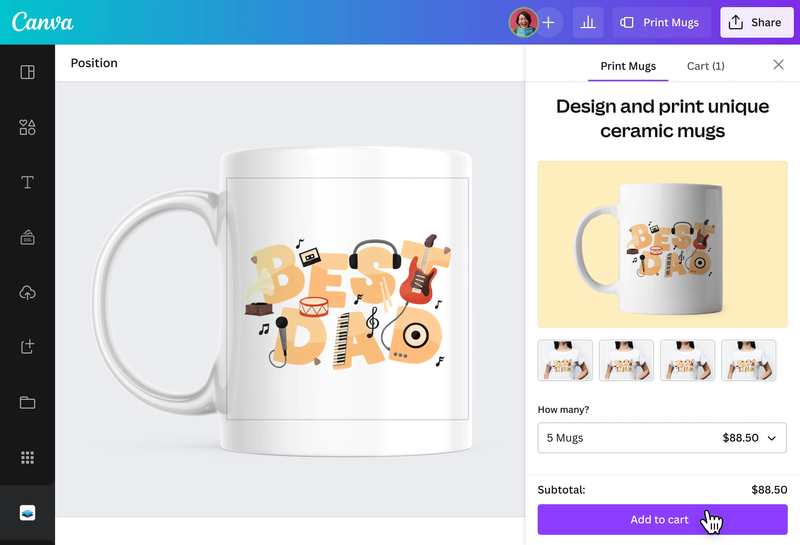
Recently, the most outstanding feature of Canva tailored for print-on-demand businesses is generating mockups for many popular product types such as T-shirts, hoodies, mugs, canvas prints, etc.
Canva stands out for its user-friendly interface, making it accessible even for those without graphic design skills.
The new 'Magic Studio' feature set provides users with an impressive array of AI tools
Canva makes collaboration in one design easy, especially when you use the "Canva for team" pricing plan
Its mobile app is highly functional, and ideal for creating on-the-go visuals for social media marketing.
Cons
Compared to other AI tools, Canva is quite simple. In particular, the lack of exporting to the PSD option is one of the biggest concerns with many designers.
Because of an online tool that has no clear way to back up your projects, the Internet connection is quite crucial to ensure the final image's quality.
There are limits to cloud storage, especially for free users.
Canva prefers to use an AI chatbot, while online support is only available for certain issues.
Pricing
Canva is known as one of the user-friendly tools at reasonable prices.
With Canva's free plan, users can still use more than 250,000 free templates with 100+ design types, like social media posts, email marketing, presentations, letters, etc.
Canva Pro costs $12.99 per month per user and provides access to premium stock photos, videos, templates, and all features in Magic Studio.
For team collaboration with features like approval workflows and activity logging, the Canva for Teams plan costs $14.99 per month for the first 5 people.
Conclusion
Here are the best print-on-demand AI tools that sellers should utilize to optimize their businesses. By using reasonable prompts, sellers can save a lot of money and time doing many tasks such as designing or improving marketing campaigns.
Despite each tool's disadvantages, understanding its strengths and weaknesses will surely empower print-on-demand merchants to use them effectively. Hope that these tools today can help POD merchants improve their stores and boost sales.
Written by
Dieu LinhI fall in love with finding creative ways to promote print-on-demand products online. If you need more creative ideas to optimize for your e-commerce business, especially for POD stores, you can check my posts published on Printway's blog.
Recommended for you
Your Custom Prints, Your Way, On-Demand!
100% free to use
300+ High-Quality Products
No order minimums
Complete automation
FREE 1-on-1 Consultation: Discover POD Growth with Printway